
Search result
Front panel
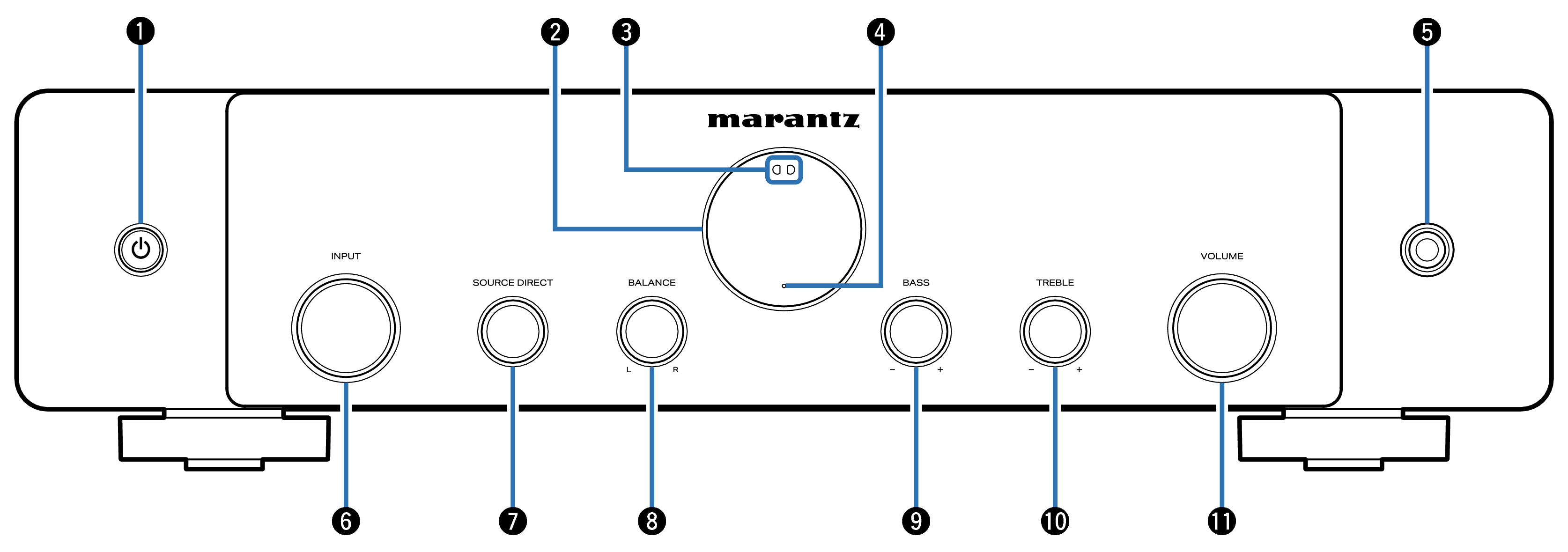
Power (  ) button
This turns the power on/off (standby). link
Display
This displays various pieces of information.
Remote control sensor
This receives signals from the remote control unit. link
Protection circuit indicator
This blinks when the protection circuit has operated. link
Headphones jack
Used to connect headphones.
When the headphones are plugged into this jack, audio will no longer be output from the connected speakers and from the PREAMP OUT connectors.
NOTE
To prevent hearing loss, do not raise the volume level excessively when using headphones.
INPUT selector knob
This selects the input source. link
SOURCE DIRECT knob
This turns source direct mode on/off. link
BALANCE control knob
This adjusts the balance of the volume output from the left and right speakers. link
BASS control knob
This setting adjusts the volume level for the bass. link
TREBLE control knob
This setting adjusts the volume level for the treble. link
VOLUME knob
This adjust the volume level. link
 ,
,  and
and  can be adjusted when
  is off (Source direct mode is off). link