
Search result
Front panel
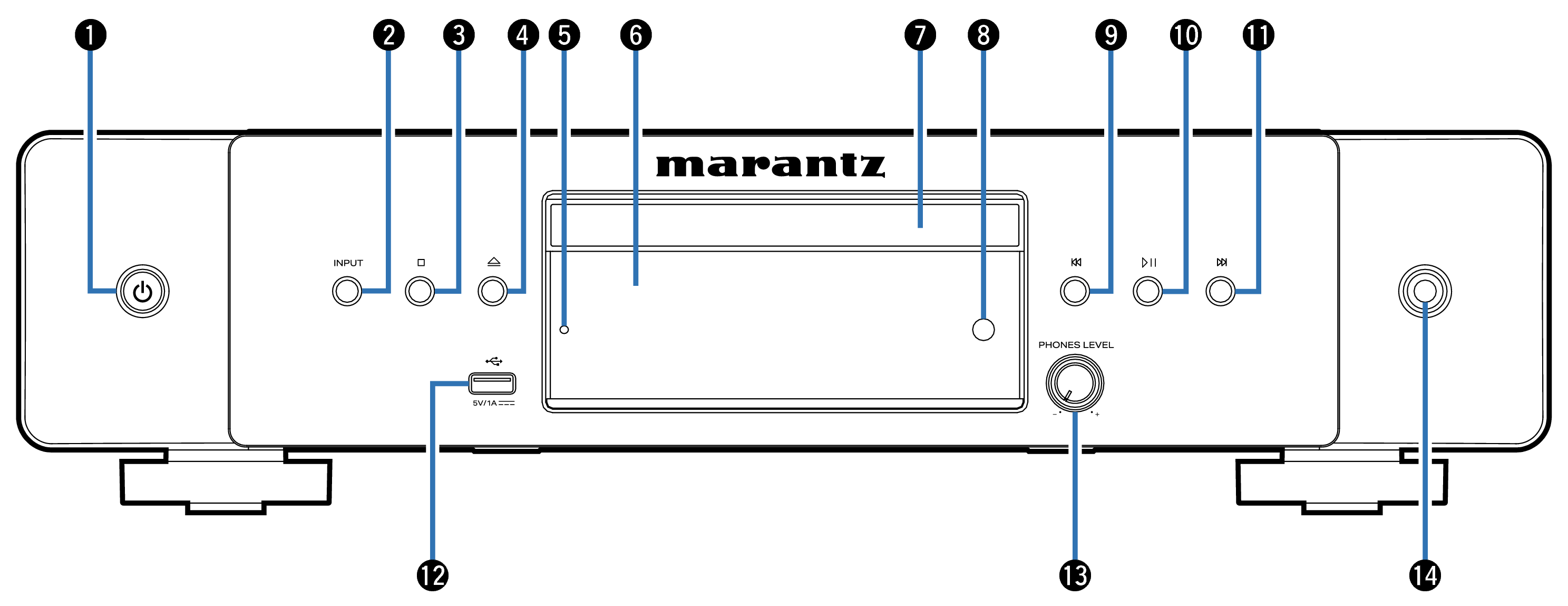
Power (  ) button
This turns the power on/off (standby). link
Media mode select button (INPUT)
Used to select the playback source.link
Stop button (  )
)
Stops playback.
Disc tray open/close button (  )
)
Opens and closes the disc tray. link
Protection circuit indicator
This blinks when the protection circuit has operated. link
Display
Various information is displayed here. link
Disc tray
Used to insert a disc.
Remote control sensor
This receives signals from the remote control unit. link
Reverse-skip button (  )
)
Returns to the start of the currently playing track. Press and hold to fast-reverse the track.
Play/Pause button (  )
)
Press this button to pause during playback. If pressed while paused or stopped, resumes playback from the last track played.
Forward-skip button (  )
)
Plays the next track. Press and hold to fast-forward the track.
USB port
This is used to connect USB storages (such as USB flash drives). link
Headphone volume control knob (PHONES LEVEL)
Adjusts the headphone volume.
Headphones jack
Used to connect headphones.
NOTE
To prevent hearing loss, do not raise the volume level excessively when using headphones.